 Productivity
Text to Image Creator
Create AI images, art, illustrations and concept visuals from text prompts. Refine descriptions, generate in three layouts, edit p...
Productivity
Floating teleprompter for Windows with auto-scrolling scripts, webcam-friendly positioning, mirror mode, adjustable speed, full-screen reading, and offline script saving.
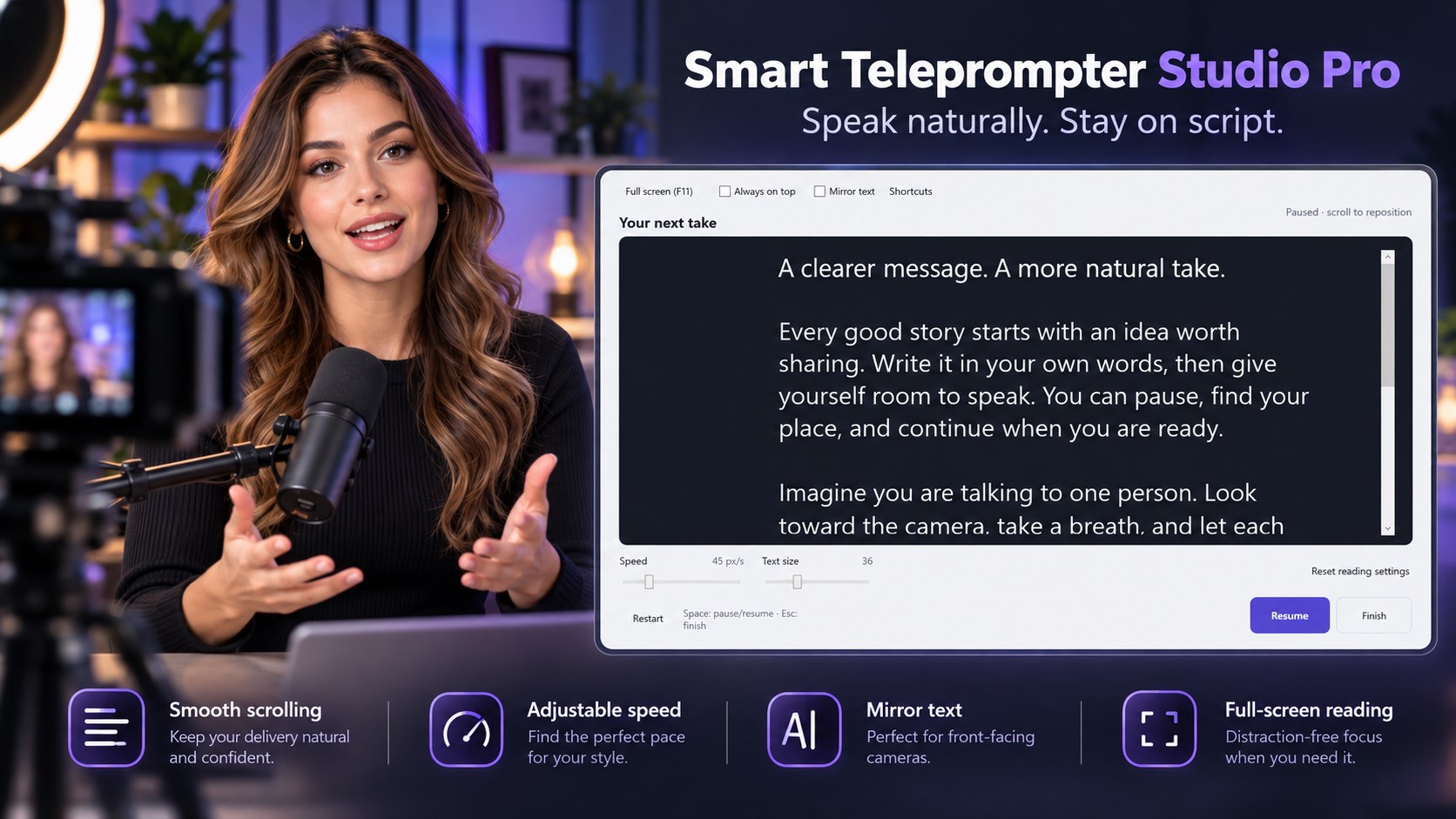
Screenshots
Why it helps
FAQ
The app displays scripts and does not record video or audio. Use your preferred recording or meeting software alongside the floating teleprompter.
Yes. Horizontal mirror mode supports compatible teleprompter glass. Hardware is not included.
Scrolling uses an adjustable speed. Speech recognition, automatic voice-following scrolling, and phone remote control are not included.
Yes. Write, edit, and save scripts locally, access your script library offline, and recover local drafts without an in-app account.
Store description
Read scripts naturally and speak with greater confidence using Smart Teleprompter Studio Pro, a floating teleprompter and automatic scrolling script reader for Windows.
Whether you're recording a YouTube video, delivering an online presentation, teaching a lesson, creating a software tutorial, or preparing an important speech, Smart Teleprompter Studio Pro helps you keep your words visible and stay focused on your delivery. Paste your script, adjust the text size and scrolling speed, position the floating teleprompter near your webcam, and start reading.
Use full-screen mode for distraction-free speaking or mirror mode for compatible teleprompter glass. A straightforward Windows teleprompter designed to make prepared speaking easier. FLOATING TELEPROMPTER — READ SCRIPTS NEAR YOUR WEBCAM Keep your script visible while working with other Windows applications. • Floating Teleprompter — Display your script in a movable reading window.
• Webcam Teleprompter — Position the text near your computer camera while recording with your preferred video software. • Always on Top — Keep the teleprompter visible above other windows. • Resizable Window — Adjust the reading area to fit your screen and workspace. • Full-Screen Teleprompter — Switch to a focused, distraction-free reading experience.
• Flexible Positioning — Move the prompter wherever it's most comfortable to read. Ideal for video presentations, tutorials, webcam recordings, virtual meetings, and other situations where you need prepared words close to your line of sight. AUTO-SCROLLING SCRIPT READER Stop manually scrolling through your notes while trying to speak.
Smart Teleprompter Studio Pro automatically scrolls your script at a speed you control. • Automatic Text Scrolling — Keep your script moving as you speak. • Adjustable Scroll Speed — Find a comfortable pace for your delivery. • Custom Text Size — Make your script easier to read. • Pause & Resume — Stop the scrolling whenever you need a moment. • Restart Prompting — Begin reading your script again.
• Scroll Back — Return to earlier lines when you lose your place. • Finish — Return to the editor with your script preserved. Read smoothly at your preferred pace, whether you're preparing a short video introduction or delivering a longer presentation. TELEPROMPTER MIRROR MODE Use horizontal text mirroring when working with physical teleprompter equipment. • Flip your script horizontally for teleprompter glass.
• Combine mirror mode with adjustable scrolling speed. • Customize the reading size for your setup. • Switch between normal and mirrored text as needed. A practical feature for creators and presenters who use compatible camera-mounted teleprompter glass. SCRIPT EDITOR — WRITE, PASTE & IMPORT TEXT Get your script ready without a complicated setup process. • Type scripts directly in the built-in editor.
• Paste text from other applications. • Import plain text (.txt) files. • Try the included editable sample script. • Make changes before starting your presentation. • Export your scripts as UTF-8 text files. • Return to your script after finishing a prompting session. Simply prepare your words, select Start Prompting, and begin reading.
SAVE SCRIPTS & BUILD YOUR PERSONAL LIBRARY Keep important scripts organized for future presentations and recordings. • Save scripts with custom names. • Reopen saved content from My Scripts. • Edit existing scripts for another recording or presentation. • Use local draft recovery to help restore unfinished work. • Keep your preferred reading settings between sessions.
• Export scripts for use in other text-compatible applications. Whether you're producing regular videos, teaching classes, or practicing speeches, your prepared scripts remain available for future use. OFFLINE TELEPROMPTER FOR WINDOWS Read and manage your scripts without relying on an online teleprompter service. • Core teleprompter features work offline. • Write and edit scripts locally.
• Access your saved script library without an internet connection. • No in-app account required. • No script uploads by the application. • No cloud synchronization required. • Local draft recovery and saved reading preferences. Your scripts remain on your Windows device, making this a convenient option for users who prefer an offline script reader.
Related apps
Productivity
Create AI images, art, illustrations and concept visuals from text prompts. Refine descriptions, generate in three layouts, edit p...
 Productivity
Edit, format, beautify and validate JSON on Windows. Compare files with JSON diff, explore a searchable tree, run JSONPath queries...
 Productivity
Manage passwords in an offline Windows vault. Organize logins, generate passwords, check password health, import CSV files, and ba...